
- Home
- Industries
Industries
Enabling transformation and progress across a wide range of industries globally, fostering innovation and growth in every sector.
Explore all → - Solutions
Connectivity
Connecting industries worldwide with reliable satellite internet solutions, driving innovation, efficiency, and growth across all sectors globally.
Explore all → - Services
Professional VSAT & IT Services
Delivering expert VSAT and IT solutions for seamless connectivity, reliability, and performance across all sectors.
Explore all → - Products
Superior Connectivity, Trusted Solutions
Offering premium Satcom products that guarantee reliable connectivity and boost innovation across industries.
Explore all → - Coverage
WorldWide Coverage
Delivering tailored satellite services that enhance connectivity, foster innovation, and support growth in every industry.
Explore all → - About
- Blog
- Contact
Thuraya FT2225 M2M Terminal
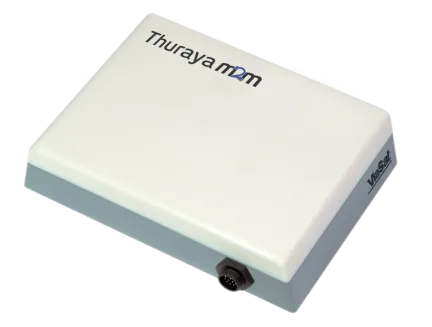
Thuraya FT2225 M2M Terminal
The Thuraya FT2225 is a rugged satellite M2M (IoT) terminal that links remote equipment to a control centre over Thuraya's L-band network. A single sealed outdoor unit with built-in L-band and GNSS antennas, it provides an encrypted, low-latency, two-way IP connection with Ethernet, serial, CAN bus, Modbus, USB and Wi-Fi interfaces. It is used for SCADA, oil and gas and pipeline monitoring, utilities and smart grid, remote ATMs and point-of-sale, and emergency warning systems.
Key Features
- Satellite M2M terminal for real-time, two-way monitoring and control
- Built-in L-band and GNSS antennas in one sealed outdoor unit
- Ethernet, serial, CAN bus, Modbus and USB connections, plus Wi-Fi
- Encrypted, low-latency IP link supporting TCP/IP and UDP
- Embedded GPS and GLONASS positioning
Technical Specifications
Typical Applications
- SCADA and pipeline monitoring
- Utilities and smart grid
- Remote ATMs and point-of-sale
- Emergency warning systems
Satellite Backhaul for SCADA, ATMs and Unmanned Sites
The Thuraya FT2225 is a satellite M2M terminal, not a telephone or office internet terminal. It connects remote equipment such as controllers, sensors, ATMs and point-of-sale systems to a control centre over Thuraya's L-band network, using an encrypted, low-latency IP link that supports both real-time monitoring and remote control. Typical deployments include SCADA for oil and gas, pipeline and water-well monitoring, power distribution and smart-grid sites, remote banking services and emergency warning systems. Because the connection is two-way, operators can adjust a valve, restart a pump or poll a meter from headquarters without sending a crew to a site that may be hours from the nearest road.
Mounting and Wiring the FT2225
Everything RF-related sits inside the FT2225's compact outdoor housing, which contains a dual-polarization L-band antenna plus GPS and GLONASS antennas, so there is no separate antenna to install. Mount the unit on a pole or flat surface with an unobstructed line of sight to the Thuraya satellite, and aim it with the help of the smartphone pointing apps referenced in the user guide. Power and data run through a multi-pin connector that provides Ethernet, serial, CAN bus, Modbus and USB, and technicians can configure and test the terminal from a laptop through its web interface. The sealed housing is designed for unattended sites exposed to extreme heat, dust and high winds.
Frequently Asked Questions
Can I make phone calls or browse the internet with the Thuraya FT2225?
The FT2225 is designed to move machine data, not to serve as an office phone or internet terminal, and it has no analogue phone port. If people working at the site also need calls or internet access, pair it with a Thuraya handset or a broadband terminal. Ask GCCSAT, an authorized Thuraya dealer, which combination suits your site.
Does the FT2225 need an external antenna?
No. Thuraya confirms the FT2225 needs no external antenna: the terminal itself contains a dual-polarization L-band antenna plus GPS and GLONASS antennas. Install the whole unit outdoors on a pole or surface mount where nothing blocks its view of the satellite, then run the multi-pin cable to your equipment cabinet.
What field equipment can connect to the FT2225?
Through its multi-pin connector the FT2225 offers Ethernet, serial, CAN bus, Modbus and USB, it also has Wi-Fi, and it supports both TCP/IP and UDP. That lets you link PLCs, RTUs, meters and other controllers to an existing SCADA or monitoring system, adding satellite backhaul without replacing the field hardware you already run.
Related Services
Enquire About Thuraya FT2225 M2M Terminal
Our sales team will provide pricing, availability, and shipping details.
Request a QuoteWhatsAppMore L-Band Satellite Terminals
Product Categories
- VSAT BUC
- VSAT LNB
- VSAT Antennas
- VSAT Fixed Antennas
- VSAT Flyaway Antennas
- VSAT Maritime Antennas
- VSAT KingSat Antennas
- L-Band Satellite Terminals
- Cobham BGAN Terminals
- Thuraya L-Band Terminals
- VSAT Satellite Modems
- Satellite Phones
- Teltonika Products
- Sangfor Firewall & SD-WAN
- Thuraya Accessories
- Excelerate Hybrid Connectivity
- Peplink Products
- VSAT RF Components
- VSAT Hub & Test Equipment
- Remote Site Power Systems